---
title: Getting Started Guide
description: Intro To Volusion Welcome to Volusion! Our all-in-one ecommerce solution has everything your business needs to succeed.
---
[Skip to content](https://help.volusion.com/s/gettingstartedguide#main-content)
English - United States
Show submenu for translations

Open main navigation
Close main navigation
- English - United States
Show submenu for translations
- [Contact Us](https://volusion.com/contact)
[Contact Us](https://volusion.com/contact)
Search the Help Center
- There are no suggestions because the search field is empty.
1. [Volusion Help Center](https://help.volusion.com/s?hsLang=en-us)
2. [V1](https://help.volusion.com/s/v1?hsLang=en-us)
# Getting Started Guide
**Intro To Volusion**
Welcome to Volusion! Our all-in-one ecommerce solution has everything your business needs to succeed. From customizable themes, seamless checkout, powerful integrations, built-in SEO management, 24/7 support and more, we help you reach more customers and grow your sales.
You've taken the first step in creating your online storefront...now what? Not to worry, we've outlined step-by-step instructions on how to get your ecommerce store up and running smoothly. Read through our Getting Started Guide below to learn how to design your storefront, add your first product, setup your domain and more.
If you haven't already, please sign up for our[f](https://volusion.com/free-trial/)[ree trial](https://volusion.com/free-trial/), and our onboarding wizard will give you step-by-step instructions for setting up your online store.
Before proceeding, log into your [Dashboard /FreeTrial](https://volusion.com/login/).
**On This Page:**
**[Design Your Storefront](https://help.volusion.com/s/gettingstartedguide#designstorefront)
[Add Your First Product](https://help.volusion.com/s/gettingstartedguide#FirstProduct)
[Setup Your Payment Methods](https://help.volusion.com/s/gettingstartedguide#setuppayments)
[Setup Your Shipping Methods](https://help.volusion.com/s/gettingstartedguide#setupshipping)
[Set up your Domain](https://help.volusion.com/s/gettingstartedguide#setupdomain)**
**Designing your StoreFront:**
Volusion's [Site Designer](https://help.volusion.com/s/site-designer-themes?hsLang=en-us)was created with one thing in mind; Making it as easy as possible to create a visually stunning site for Desktop and Mobile Devices.Let's Get started!
Inside your admin [Dashboard](https://volusion.com/login/) navigate to Design \> Site Designer to access the Site Designer Tool.
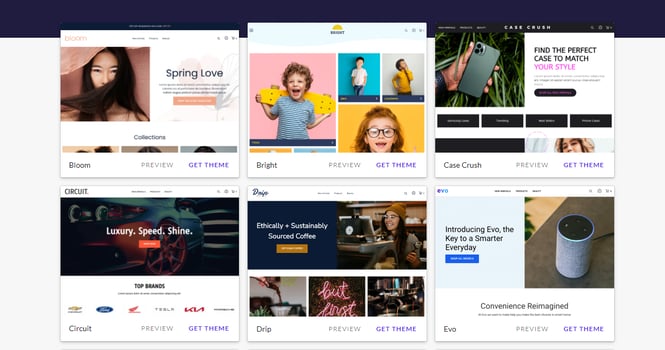
Browse our [Theme Galler](https://help.volusion.com/s/Site-Designer-Themes?hsLang=en-us)y and preview how it will look with your store's products.
**First click Change Theme**

**Click the Theme Gallery Button**

Use the **Preview Button** to see how the theme will look on your store, and select 'Get Theme' to start Designing!
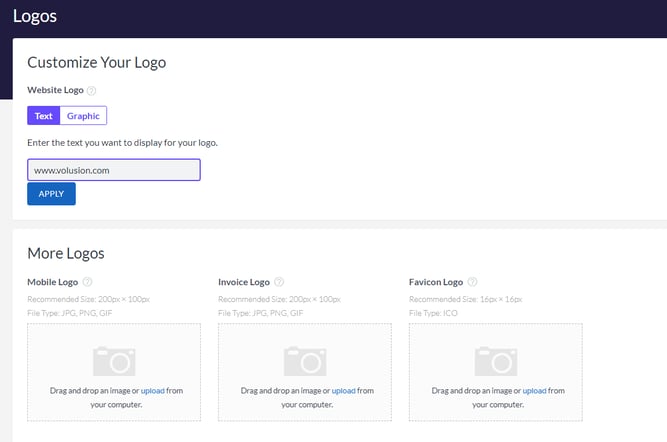
Add a **Logo** for your Storefront , Mobile Storefront, and your Email Invoices Under Design \> Logos
**Adding Your First Product:**
[Back To Top](https://help.volusion.com/s/gettingstartedguide#backtotop)
Volusion allows you to create products easily with our Inventory Page. Whether it's doing bulk updates to thousands of products at once, or creating and managing complex skus with various options, all you need to do is start adding them to your store! What are you waiting for!
**Basic Product Setup:**
Within your Dashboard, go to **Inventory \> Products** and click Add:
All products require 4 basic settings: Name, Code, Price, and Weight.
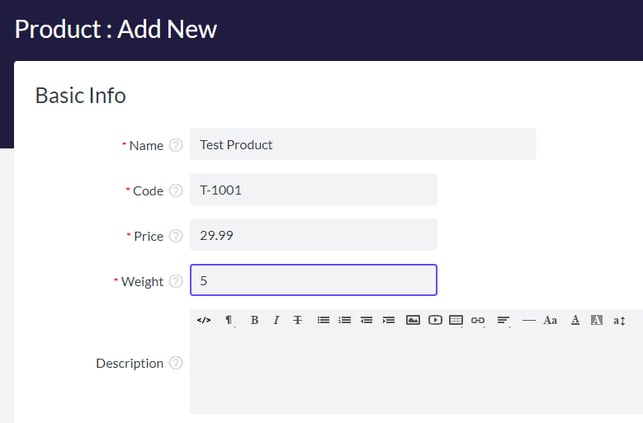
***\*The Product Code must be unique for every product in your store. At this stage, we recommend hitting save to create the product in the system***.
Continue learning more about Product setup and the advanced features here:
[Products: Basic Features](https://help.volusion.com/s/products-basic-features?hsLang=en-us)
[Products: Advanced Features](https://help.volusion.com/s/productsadvancedfeatures?hsLang=en-us)
[Option Categories & Options](https://help.volusion.com/s/optioncategoriesoptions?hsLang=en-us)
Set Up Your Payment Methods:
[Back To Top](https://help.volusion.com/s/gettingstartedguide#backtotop)
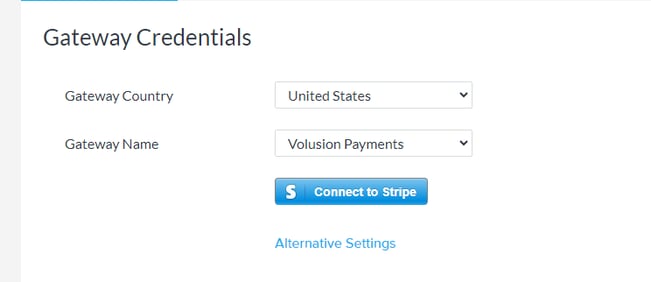
[Volusion's Payments Powered by Stripe](https://help.volusion.com/s/setting-up-volusion-payments-powered-by-stripe?hsLang=en-us) is our safest and most reliable payment gateway, with modern options such as Google Pay, Apple Pay, Buy Now Pay Later, and easy wallet checkout, as well as no maintenance fees.
To get started, in your Admin Dashboard, go to **Settings \> Payments.**
Click the **Connect to Stripe** Button to begin the sign up process!
You can also offer PayPal with [Paypal's Commerce Platform](https://help.volusion.com/s/accepting-payments-with-paypal-on-volusion?hsLang=en-us), as well as [Authorize.net](https://help.volusion.com/s/howtosetupauthorizenet?hsLang=en-us), and [Amazon Pay](https://help.volusion.com/s/usingamazonpaywithvolusion?hsLang=en-us)
**Setup your Shipping Methods:**
[Back To Top](https://help.volusion.com/s/gettingstartedguide#backtotop)
Volusion offers the ability to provide your customers with [Live Rate Shipping](https://help.volusion.com/s/shipping?hsLang=en-us) directly from carriers like [USPS](https://help.volusion.com/s/shippingwithusps?hsLang=en-us) , UPS, and Fedex, as well as letting you create your own custom [Flat rates](https://help.volusion.com/s/flat-rateshipping?hsLang=en-us). You can also configure products that have specific shipping costs with [Fixed Shipping](https://help.volusion.com/s/additionalshippingcapabilities?hsLang=en-us) rates, or everyone's favorite [Free Shipping](https://help.volusion.com/s/additionalshippingcapabilities?hsLang=en-us)!
**In your Admin Dashboard go to Settings \> Shipping to get started.**
1\. In the upper left corner, add the address of your Origin Ship From Location by clicking edit. This will be used to as the origin for live shipping rate calculation.
2\. Select the Ship to Locations where you will offer your amazing products ! Add the countries or States you would like to include or exclude. If you only want to ship to the United States, put 'United States' in the 'include' box.
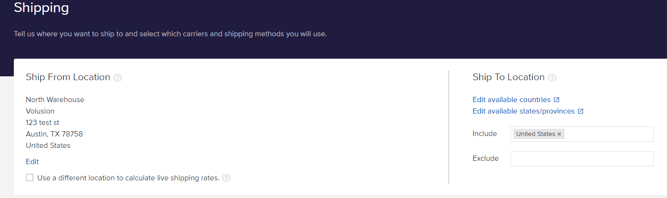
You can now add the Shipping methods you wish to offer. Use the articles below to learn how to configure various different kinds of shipping options.
[Free Shipping](https://help.volusion.com/s/additionalshippingcapabilities?hsLang=en-us)
[Live Rates](https://help.volusion.com/s/shipping?hsLang=en-us)
[Flat Rates](https://help.volusion.com/s/flat-rateshipping?hsLang=en-us)
[Fixed Rates](https://help.volusion.com/s/additionalshippingcapabilities?hsLang=en-us)
[Instore Pickup](https://help.volusion.com/s/additionalshippingcapabilities?hsLang=en-us)
[Downloadable/Digital Products](https://help.volusion.com/s/shipping?hsLang=en-us)
**Set Up Your Domain:**
[Back To Top](https://help.volusion.com/s/gettingstartedguide#backtotop)
If you need to register a domain, you can use many different domain registrar's such as [Hover](https://www.hover.com/) or [Godaddy](https://www.godaddy.com/)
When you are ready to officially launch your store to the world, you'll need to make changes to your Domain's DNS.
Follow our [Going Live on your Domain](https://help.volusion.com/s/goliveonyourdomainname?hsLang=en-us) article for next steps. If you need help , please reach out to our [Support Team](https://www.volusion.com/contact)for Assistance !
### Continue to our next guide about:
- [Getting started](https://help.volusion.com/s/getting-started?hsLang=en-us)
- [Manage Your Store](https://help.volusion.com/s/manage-your-store?hsLang=en-us)
- [Marketing for Success](https://help.volusion.com/s/marketing-for-success?hsLang=en-us)
- [Volusion Payment Powered by Stripe](https://help.volusion.com/s/volusion-payment-powered-by-stripe?hsLang=en-us)
- [Partner Marketplace](https://help.volusion.com/s/partner-marketplace?hsLang=en-us)
- [Support](https://help.volusion.com/s/support?hsLang=en-us)
- [V1](https://help.volusion.com/s/v1?hsLang=en-us)
- [Security](https://help.volusion.com/s/security?hsLang=en-us)
[](https://volusion.com/)
[mailto:email@email.com](mailto:email@email.com)
Copyright © 2026, Volusion