---
title: Setting up Volusion Payments Powered by Stripe
description: What is Volusion Payments Powered by Stripe?
---
[Skip to content](https://help.volusion.com/s/setting-up-volusion-payments-powered-by-stripe#main-content)
English - United States
Show submenu for translations

Open main navigation
Close main navigation
- English - United States
Show submenu for translations
- [Contact Us](https://volusion.com/contact)
[Contact Us](https://volusion.com/contact)
Search the Help Center
- There are no suggestions because the search field is empty.
1. [Volusion Help Center](https://help.volusion.com/s?hsLang=en-us)
2. [Volusion Payment Powered by Stripe](https://help.volusion.com/s/volusion-payment-powered-by-stripe?hsLang=en-us)
# Setting up Volusion Payments Powered by Stripe
### **What is Volusion Payments Powered by Stripe?**
Volusion Payments Powered by Stripe is a simple and powerful way to accept payments natively in your Volusion store. We built Volusion Payments using Stripe's world-class infrastructure. Millions of businesses--ranging from startups to Fortune 500 companies--also rely on Stripe's software tools to accept payments securely and expand globally.
### **Is Volusion Payments secure? Will I be PCI-compliant?**
Yes! Volusion Payments meets and exceeds the most stringent industry standards for security. Stripe is also audited by a PCI-certified auditor and is certified to PCI Service Provider Level 1. This is the highest level of certification available. Visit [Security at Stripe](https://stripe.com/docs/security) to learn more about the technical details of Stripe's secure infrastructure. You can see Stripes' PCI certification [here](https://www.visa.com/splisting/searchGrsp.do?companyNameCriteria=stripe).
### **Who is Volusion Payments for? Who cannot use Volusion Payments?**
Volusion Payments is currently available to US merchants only.
Confirm your business type is allowed by reviewing [Stripe's Prohibited & Restricted Businesses](https://stripe.com/legal/restricted-businesses). If you're not sure if your business falls into the categories listed here, reach out to our Payments Team at (800)-646-3517 ext. 3
### **Is Volusion Payments a gateway? Why should I use Volusion Payments instead of other gateways?**
Volusion Payments Powered by Stripe is a complete solution that combines the functionality of a merchant account and a gateway in one, which means you can accept payments and deposit funds into a bank account without extra steps or additional tools to maintain. You cannot use existing merchant accounts or gateways with Volusion Payments Powered by Stripe, as it functions as both already.
### **What payment methods can I accept with Volusion Payments?**
Merchants can also accept the payment methods below.
- **Visa, MasterCard, Discover, and American Express**
- **Apple Pay**: Works on Apple devices operating using Safari starting with iOS 10.
- **Google Pay**: Works on Android devices using Chrome with Google Pay configured in the browser.
- [**Stripe Link**](https://stripe.com/docs/payments/link): Saves and auto-fills your customers' payment and shipping information for faster checkout.
- [**Buy Now Pay Later**](https://help.volusion.com/s/volusion-payments-buy-now-pay-later?hsLang=en-us): Financing options through Affirm, Afterpay, and Klarna.
### **Do I need to make changes within my store before applying for Volusion Payments?**
In order to use Volusion Payments powered by Stripe, your store must have Premium Checkout enabled. Review our [Premium Checkout Help Center Article](https://help.volusion.com/s/premium-checkout?hsLang=en-us) for information about Premium Checkout and how to enable it.
### **What will my customers see when they checkout?**
In the Payment Screen of the checkout page, there will be a radio button labeled Common Payment Methods. This is where the shopper can choose to enter their credit card information or choose to use one of the other payment options offered.
**Premium Checkout:**
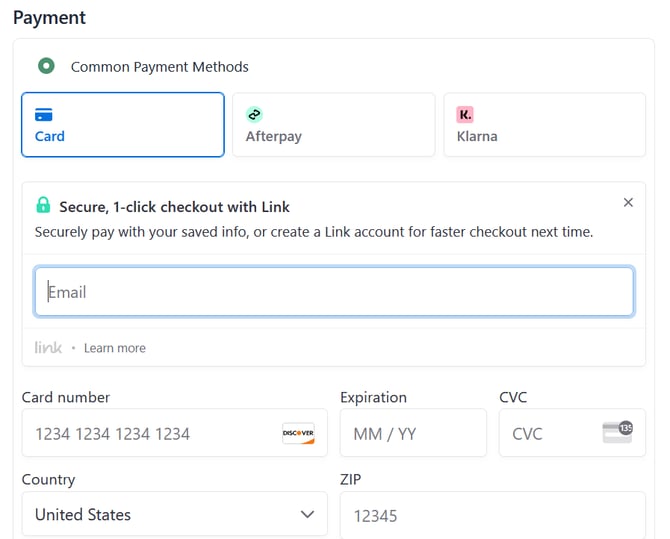
**One Page Checkout (Premium Checkout Disabled)**
### [**How do I sign up for Volusion Payments?**](https://help.volusion.com/s/setting-up-volusion-payments-powered-by-stripe#signup)
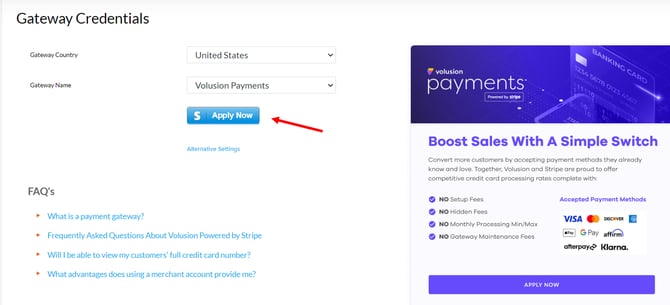
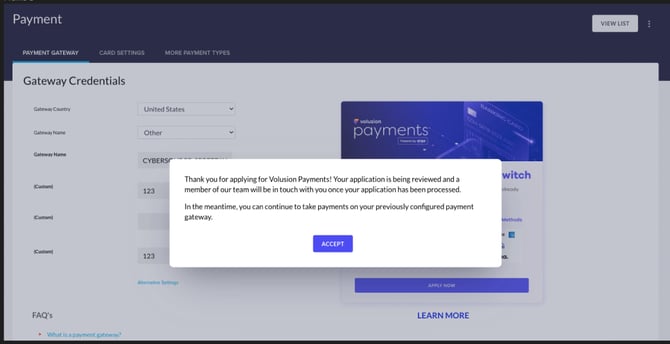
Sign in to your Volusion store and click on **Settings**. From there, click on **Payments**. Select **Volusion Payments** from the **Gateway Name** drop-down and click on the **Apply Now** button to begin the onboarding process. *Be sure to fill out all of the fields and agree to the terms to begin processing quickly!*
**Not seeing the Credit Card Fields on the Checkout Page?**
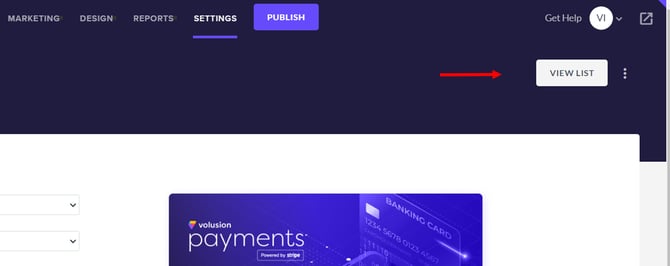
Ensure that the 'Common Payment Method" setting is enabled. You can verify this by clicking the 'View List' button on the top right of the Settings \> Payments Page. You must have the 'Common Payment Method' payment method enabled.
### **What information and documents do I need to sign up for Volusion Payments?**
To sign up for an account, you'll need an email address and password. To activate your account, we need details about your business and about you. Common follow-up requirements include:
- [Photo identification documents](https://support.stripe.com/questions/troubleshooting-id-upload-for-identity-verification)
- [Address verification](https://support.stripe.com/questions/verifying-your-business-address)
- [Website Checklist](https://stripe.com/docs/checklist/website)
- [Business Name and Tax ID Verification](https://support.stripe.com/questions/using-irs-documentation-as-reference-when-entering-business-name-and-tax-id-number-%28tin%29-for-us-based-businesses)
- [Bank account ownership verification](https://support.stripe.com/questions/bank-account-ownership-verification)
### **What do I do if I have issues signing up with Volusion Payments or additional questions?**
Our Payments Team is here to help and can be reached Monday through Friday between 9 am and 5 pm CT at (800)-646-3517 ext. 3
### **Why was my application declined?**
As Volusion Payments provides financial services, there are a number of restrictions we have to operate under. We have outlined these in our [Terms of Service](https://volusion.com/volusion-payments-stripe-terms/).
If your account is not approved and you would like to switch to a different payment gateway, log into the Admin Dashboard and click on **Settings** \> **Payment**. Under the Volusion Payments section, click on the **Disconnect Stripe** button and then you can select and plug in one of our other [Payment Gateway Integrations](https://help.volusion.com/s/paymentgatewayintegrations?hsLang=en-us).
- [Getting started](https://help.volusion.com/s/getting-started?hsLang=en-us)
- [Manage Your Store](https://help.volusion.com/s/manage-your-store?hsLang=en-us)
- [Marketing for Success](https://help.volusion.com/s/marketing-for-success?hsLang=en-us)
- [Volusion Payment Powered by Stripe](https://help.volusion.com/s/volusion-payment-powered-by-stripe?hsLang=en-us)
- [Partner Marketplace](https://help.volusion.com/s/partner-marketplace?hsLang=en-us)
- [Support](https://help.volusion.com/s/support?hsLang=en-us)
- [V1](https://help.volusion.com/s/v1?hsLang=en-us)
- [Security](https://help.volusion.com/s/security?hsLang=en-us)
[](https://volusion.com/)
[mailto:email@email.com](mailto:email@email.com)
Copyright © 2026, Volusion