---
title: Your Store Pricing Structure
description: With your Volusion store pricing structure, you can show customers what kind of deal they're getting from lower-than-suggested list prices to sales.
---
[Skip to content](https://help.volusion.com/s/yourstorepricingstructure#main-content)
English - United States
Show submenu for translations

Open main navigation
Close main navigation
- English - United States
Show submenu for translations
- [Contact Us](https://volusion.com/contact)
[Contact Us](https://volusion.com/contact)
Search the Help Center
- There are no suggestions because the search field is empty.
1. [Volusion Help Center](https://help.volusion.com/s?hsLang=en-us)
2. [V1](https://help.volusion.com/s/v1?hsLang=en-us)
# Your Store Pricing Structure
With your Volusion store pricing structure, you can show customers what kind of deal they're getting from lower-than-suggested list prices to sales.
The most basic pricing model available for display on your product page includes the **List Price, Our Price** and the **Sale Price**.
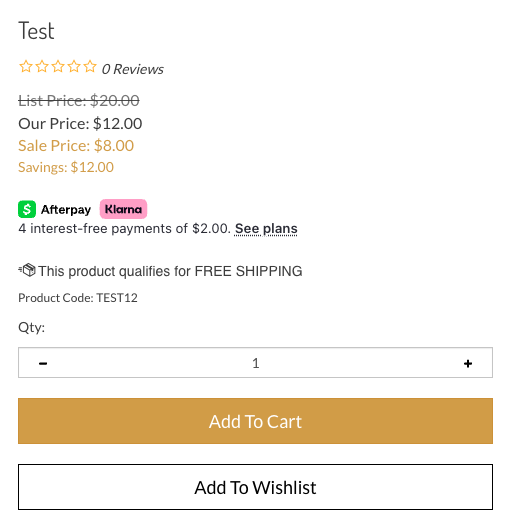
List Price
This price is often the Manufacturer Suggested Retail Price (MSRP). If its greater than the price you are offering, you can display it to let customers see how much theyre saving by shopping with you. To configure, go to the **List Price** in the **Advanced Settings \> Pricing section** of the product page.
Our Price
This is the regular price that you are selling the product for. It corresponds to the required **Price field** in the Basic Info section of each product's page in the Admin Area. By default, it will be displayed as **Our Price** on your storefront.
Sale Price
The Sale Price will override Our Price if the Sale Price is lower. Configure a product Sale Price in **Advanced Settings \> Pricing** on the product page in your Admin Area. Displaying Our Price along with the Sale Price can help emphasize products that are on sale.
Savings
Savings will show the difference between the List Price and Sale Price, or the difference between Our Price and Sale Price if no List Price is entered.
- [Getting started](https://help.volusion.com/s/getting-started?hsLang=en-us)
- [Manage Your Store](https://help.volusion.com/s/manage-your-store?hsLang=en-us)
- [Marketing for Success](https://help.volusion.com/s/marketing-for-success?hsLang=en-us)
- [Volusion Payment Powered by Stripe](https://help.volusion.com/s/volusion-payment-powered-by-stripe?hsLang=en-us)
- [Partner Marketplace](https://help.volusion.com/s/partner-marketplace?hsLang=en-us)
- [Support](https://help.volusion.com/s/support?hsLang=en-us)
- [V1](https://help.volusion.com/s/v1?hsLang=en-us)
- [Security](https://help.volusion.com/s/security?hsLang=en-us)
[](https://volusion.com/)
[mailto:email@email.com](mailto:email@email.com)
Copyright © 2026, Volusion