---
title: Volusion's Automatic Tax Feature
description: Merchants who are based in the United States can take advantage of the automatic tax integration.
---
[Skip to content](https://help.volusion.com/s/volusionsautomatictaxfeature#main-content)
English - United States
Show submenu for translations

Open main navigation
Close main navigation
- English - United States
Show submenu for translations
- [Contact Us](https://volusion.com/contact)
[Contact Us](https://volusion.com/contact)
Search the Help Center
- There are no suggestions because the search field is empty.
1. [Volusion Help Center](https://help.volusion.com/s?hsLang=en-us)
2. [V1](https://help.volusion.com/s/v1?hsLang=en-us)
# Volusion's Automatic Tax Feature
Merchants who are based in the United States can take advantage of the automatic tax integration.
**Enabling Automatic Tax Rates**
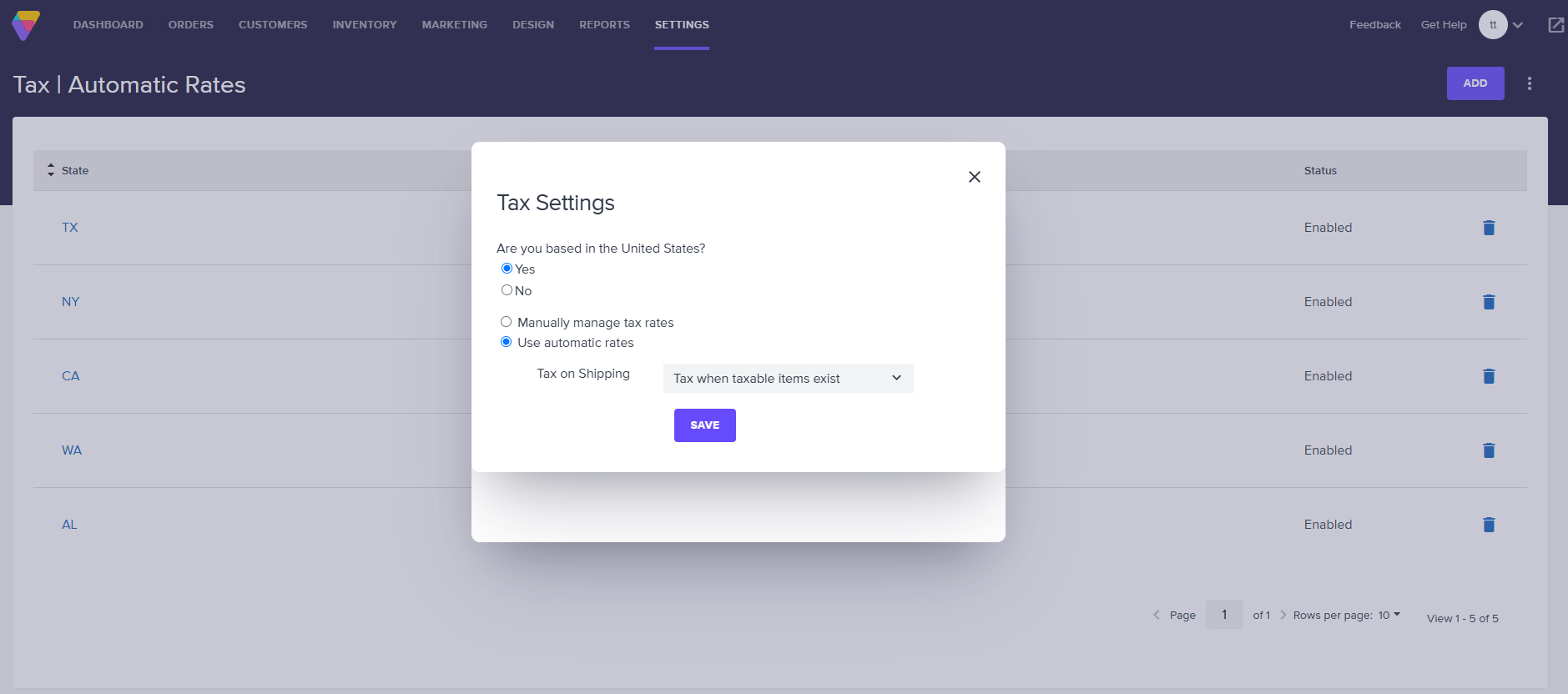
1. Go to **Settings** \> **Tax** in the Admin Area.
2. Click the three-dot menu button at the top right to open the Tax Settings popup.
3. Under "Are you based in the United States?" select **Yes**.
4. Select **Use automatic rates**.
5. Choose whether you want to charge Tax on Shipping costs. (See **Tax on Shipping** below.)
6. Click **Save.**
**Add an Automatic Tax Rate**
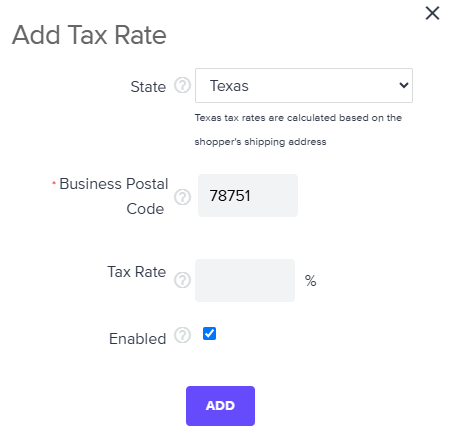
To create an automatic tax rates for a state, click **Add** at the top of the page to open the Add Tax Rate popup and make a selection from the **State** and **Business Postal Code** dropdown menus. Click **Add** to close the pop-up and add the tax rate to your store.
### **Note About Tax Calculation**
Volusion's automated tax feature will charge customers based on their shipping state and zip code.
**Customizing Automatic Tax Display on Your Storefront**
### **Tax Level Display**
By default, your customers will see tax displayed as a single, combined rate at checkout. You may want to display all available tax levels to your customers in an itemized fashion. To enable an itemized display of taxes at checkout, go to **Settings** \> **Config Variables** and enable **Display Tax Breakdown to Customer**.
This will split out the tax rates on the **Shopping Cart** and **One Page Checkout** pages of your storefront.
This will also split out the tax rates in the order confirmation email that your store sends to the customer. Note that the individual tax rates will always display in the **Details** section of the **Order Details** page.
### **Tax Name Display**
To change the text for the word tax on your storefront, go to **Design** \> **Page Text**. Scroll to Page Text ID 734. Change the word "tax" here to update how it appears on your storefront. Note that this Page Text controls the label for the combined tax as well as the label for the individual tax rates (if **Display Tax Breakdown to Customer** is enabled).
**Tax on Shipping**
In order to designate whether or not your store collects tax on shipping, go to **Tax** \> **Settings** and click **Settings** at the top of the page. Choose your preference from the **Tax on Shipping** menu, then click **Save**.
### **Using Manual Tax Rates**
Merchants can also switch to or continue using manually configured tax rates. For further instructions on setting up manual rates, see "[**Tackling Tax Rate Setup**](https://help.volusion.com/s/taxratesetup?hsLang=en-us)".
- [Getting started](https://help.volusion.com/s/getting-started?hsLang=en-us)
- [Manage Your Store](https://help.volusion.com/s/manage-your-store?hsLang=en-us)
- [Marketing for Success](https://help.volusion.com/s/marketing-for-success?hsLang=en-us)
- [Volusion Payment Powered by Stripe](https://help.volusion.com/s/volusion-payment-powered-by-stripe?hsLang=en-us)
- [Partner Marketplace](https://help.volusion.com/s/partner-marketplace?hsLang=en-us)
- [Support](https://help.volusion.com/s/support?hsLang=en-us)
- [V1](https://help.volusion.com/s/v1?hsLang=en-us)
- [Security](https://help.volusion.com/s/security?hsLang=en-us)
[](https://volusion.com/)
[mailto:email@email.com](mailto:email@email.com)
Copyright © 2026, Volusion