---
title: Volusion Cookies and You
description: Your website uses them all the time but not the ooey-gooey, fresh-baked kind.
---
[Skip to content](https://help.volusion.com/s/volusioncookiesandyou#main-content)
English - United States
Show submenu for translations

Open main navigation
Close main navigation
- English - United States
Show submenu for translations
- [Contact Us](https://volusion.com/contact)
[Contact Us](https://volusion.com/contact)
Search the Help Center
- There are no suggestions because the search field is empty.
1. [Volusion Help Center](https://help.volusion.com/s?hsLang=en-us)
2. [V1](https://help.volusion.com/s/v1?hsLang=en-us)
# Volusion Cookies and You
What are Cookies?
Cookies are small files placed on a users computer browser when they visit a website. They hold a small amount of information that tells something about that user, such as which pages they visited on the website, how many times they visited, and how much time they spent there. This helps website owners understand who their audience is and what those users are interacting with on the site.
If you're curious about thecookies your Volusion shopping cart uses to track customers, check our [Volusion Software Cookies](https://help.volusion.com/s/volusionsoftwarecookies?hsLang=en-us) article.
If you would like to learn more about the cookies we use, you can see more info in our [Privacy Policy](https://www.volusion.com/privacy-policy). The following are the most common cookies used on the Volusion platform.
Marketing Cookies
At Volusion, we like to provide the best user experience possible for our website visitors. By using cookies, we're able to provide relevant content to you by recognizing if you're a returning visitor, as well as which pages you've engaged with in the past. Some cookies help provide Volusion with analytics on anonymous visitors to help us determine which content users are engaging with the most. This, in turn, helps us to evaluate and test the best experience for our users.
Volusion implements Marketing cookies to retarget users on certain ad networks, such as Google, Bing, and Facebook. Other third-party cookies are used on our site to help enable live chat and other software. These cookies aren't used for tracking, but to provide a better user experience.
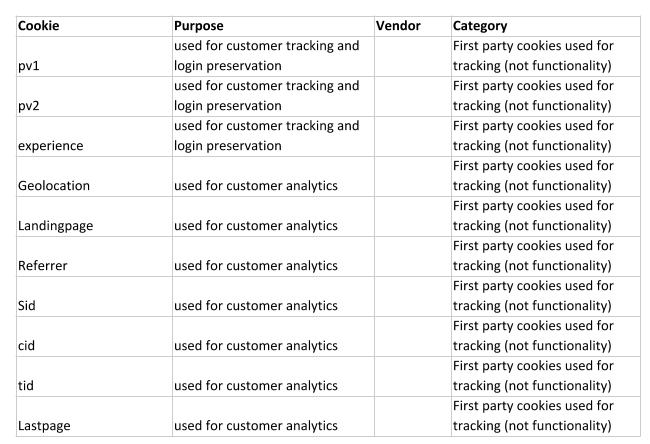
### Merchant Store and Relationship Tracking
When merchants use Volusion to power their online stores, we use the following cookies to better manage our relationship:
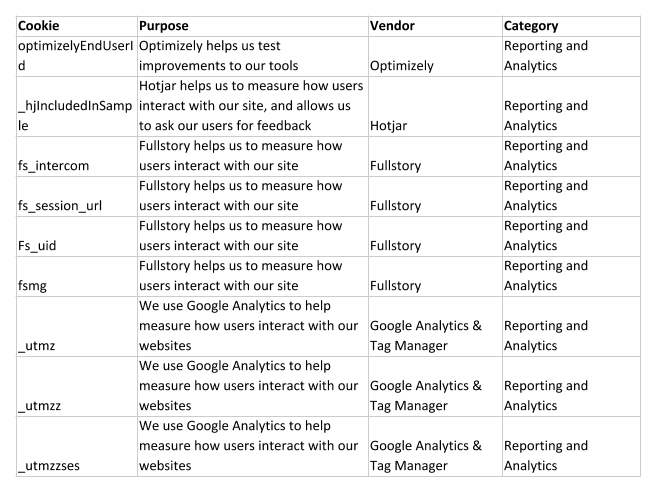
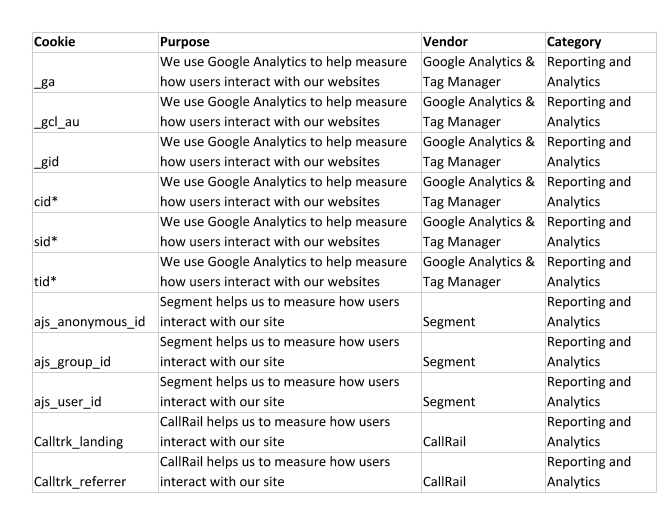
### Volusion Internal Tracking of Volusion Visitors
These are some of our internal cookies we use to analyze user behavior across [Volusion.com](http://volusion.com/):
Clearing Cache and Cookies
In general, cookies improve your user experience on websites by remembering what you've interacted with. If you think your browser may be storing cookies that either aren't relevant to you, or are negatively impacting your experience, you can erase them to temporarily clear the slate.
Each browser will have its own instructions for clearing cookies (here are [Google Chrome's instructions](https://support.google.com/accounts/answer/61416?hl=en&ref_topic=7189049)) or for completely [Clearing Browser Cache](https://help.volusion.com/s/clearingbrowsercache?hsLang=en-us).
- [Getting started](https://help.volusion.com/s/getting-started?hsLang=en-us)
- [Manage Your Store](https://help.volusion.com/s/manage-your-store?hsLang=en-us)
- [Marketing for Success](https://help.volusion.com/s/marketing-for-success?hsLang=en-us)
- [Volusion Payment Powered by Stripe](https://help.volusion.com/s/volusion-payment-powered-by-stripe?hsLang=en-us)
- [Partner Marketplace](https://help.volusion.com/s/partner-marketplace?hsLang=en-us)
- [Support](https://help.volusion.com/s/support?hsLang=en-us)
- [V1](https://help.volusion.com/s/v1?hsLang=en-us)
- [Security](https://help.volusion.com/s/security?hsLang=en-us)
[](https://volusion.com/)
[mailto:email@email.com](mailto:email@email.com)
Copyright © 2026, Volusion