---
title: UPS Negotiated Shipping Rates
description: Shipping is one of the most important aspects of an online business.
---
[Skip to content](https://help.volusion.com/s/upsnegotiatedshippingrates#main-content)
English - United States
Show submenu for translations

Open main navigation
Close main navigation
- English - United States
Show submenu for translations
- [Contact Us](https://volusion.com/contact)
[Contact Us](https://volusion.com/contact)
Search the Help Center
- There are no suggestions because the search field is empty.
1. [Volusion Help Center](https://help.volusion.com/s?hsLang=en-us)
2. [V1](https://help.volusion.com/s/v1?hsLang=en-us)
# UPS Negotiated Shipping Rates
Shipping is one of the most important aspects of an online business. Customers want to know their purchases will get to them in a timely manner, and they dont want to pay too much for it.
If you've set up live rate integration with UPS, FedEx, USPS, and/or Canada Post, your store will automatically return live rates.
But you dont have to just accept just any ol rates from your friends at UPS. You can contact them to review your shipping contract and trends, and wheel and deal to lock in a better rate.
After registering with **UPS for negotiated shipping rates**, you'll receive a **Shipper Number** from UPS that must be entered into your store, as follows:
1. In your Admin Area**,** go to **Settings** \> **Config Variables** \> **Search**.
2. Type "**Shipping UPS**" in the **Name** field.
3. Click the blue **Search** button.
4. In the **Shipping UPS Shipper Number** field, enter the shipper number provided by UPS.
5. In the **Shipping UPS Username** field, enter the username you use to log in at ups.com.
6. In the **Shipping UPS Password** field, enter the password you use to log in at ups.com.
7. In the **Shipping UPS Classification Code** field, place the value **00**
8. Save.
You should now be able to receive negotiated rates via UPS, which will make it more efficient for you to do things like ...
**Invoicing:** Send customers their invoice sooner; no need to wait for your UPS carrier bill receipt. You reduce Days Sales Outstanding.
**Order Entry:** Provide the right rates at order entry
**Cost Allocation:** Accurately allocate charges among departments
**Confirming Your Store is Receiving Negotiated Rates:**
You can determine if your store is receiving Negotiated Rates from your UPS account ,or not by running a Shipping test within your admin dashboard.
**1.** Go to Settings \> Shipping \> and scroll to the bottom of the page to the 'Test Rates' section.
**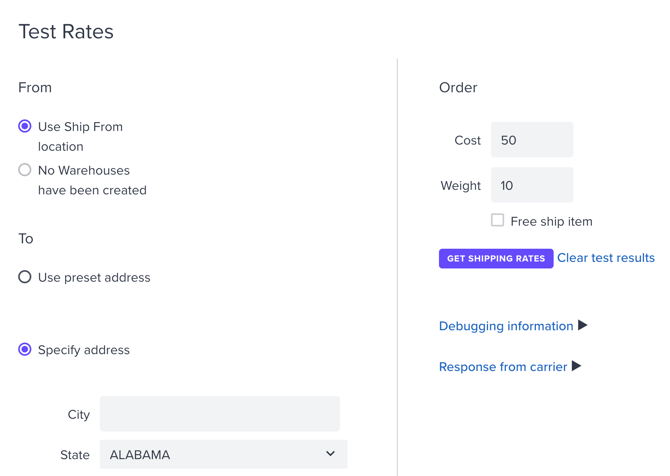**
**2.** Use either a saved pre-set address, or select 'Specify Address' and use a different address to test with.
**3.** Click the 'Get Shipping Rates' button on the right side :
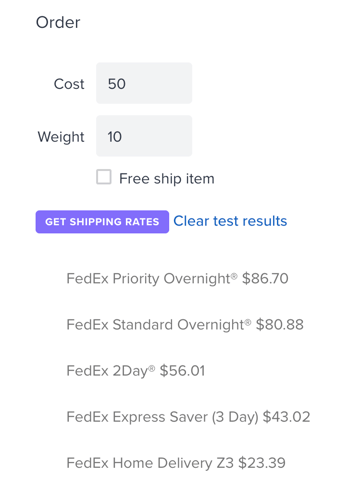
You can then click '**Response from Carrier**' to review the xml responses from UPS.
**This message means your store is now providing your UPS Negotiated Rates:**
\True\
**This message means that the Username and Password you are using for UPS is not correct and the system is unable to authenticate your account.** You will want to check and confirm your UPS account is in good standing and you are using the correct UPS Username and Password.
\Invalid Access License number\
**This message means that your UPS Username and Password are correct, but the UPS account they are associated is not qualified to receive negotiated rates.**
In this case the system will return UPS's standard retail rates. You will need to contact UPS to confirm you are using the correct account, and the account is authorized to receive Negotiated Rates.
\User Id and Shipper Number combination is not qualified to receive negotiated rates.\
**Summary**
Theres nothing thats more exciting to a shopper than receiving what they purchased online. Give them a variety of shipping options to choose from, and give yourself a break on rates by negotiating with your package partners at UPS.
- [Getting started](https://help.volusion.com/s/getting-started?hsLang=en-us)
- [Manage Your Store](https://help.volusion.com/s/manage-your-store?hsLang=en-us)
- [Marketing for Success](https://help.volusion.com/s/marketing-for-success?hsLang=en-us)
- [Volusion Payment Powered by Stripe](https://help.volusion.com/s/volusion-payment-powered-by-stripe?hsLang=en-us)
- [Partner Marketplace](https://help.volusion.com/s/partner-marketplace?hsLang=en-us)
- [Support](https://help.volusion.com/s/support?hsLang=en-us)
- [V1](https://help.volusion.com/s/v1?hsLang=en-us)
- [Security](https://help.volusion.com/s/security?hsLang=en-us)
[](https://volusion.com/)
[mailto:email@email.com](mailto:email@email.com)
Copyright © 2026, Volusion