
Written by Jared K
Smarty is an address verification tool that is available to Volusion Prime Merchants using our Premium Checkout. This tool provides verification for shopper addresses during the checkout process.
Benefits
-
Prevents delayed delivery or undelivered orders
-
Eliminates additional time needed to correct invalid address after and order is placed
-
Reduced additional shipping cost of returned orders
-
Builds trust between Merchant and Customer leading to greater likelihood of return customers
Shoppers enter their shipping address as normal on the Premium Checkout page. When they click the Continue button to save the address, Smarty conducts its address verification. If the address is correct, the Shopper proceeds through the checkout process, If the address is incorrect a warning will appear with suggestions on how to correct the address.
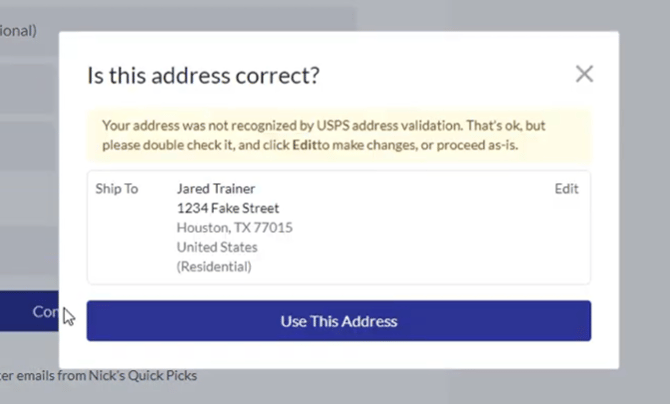
The shopper can then correct the address and proceed through the checkout process by clicking the Continue button.
Activating Address Verification
To activate this feature, a Prime Merchant must be currently using Premium Checkout.
From your site's Admin Dashboard, choose Settings > Checkout from the top level menu.

Make sure that the checkbox forPremium Checkout is checked. If it is not, check it and click the blue Save button at the top right of the page.

Scroll down the page to the Advanced section. Check the Enable Address Verification checkbox (if it is not already checked), and click the blue Save button at the top right of the page.
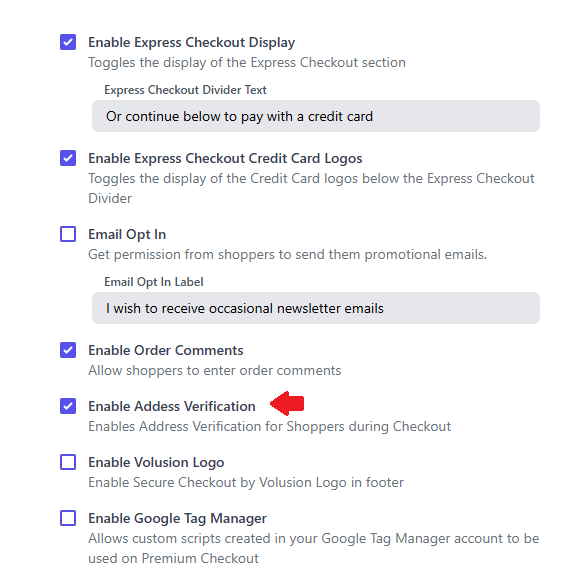
Smarty address verification is now active on your Premium Checkout page.