---
title: "Site Designer: Updating Blocks"
description: "Site Designer: Updating a Block Volusion provides frequent updates to Blocks within Site Designer."
---
[Skip to content](https://help.volusion.com/s/site-designer-updating-blocks#main-content)
English - United States
Show submenu for translations

Open main navigation
Close main navigation
- English - United States
Show submenu for translations
- [Contact Us](https://volusion.com/contact)
[Contact Us](https://volusion.com/contact)
Search the Help Center
- There are no suggestions because the search field is empty.
1. [Volusion Help Center](https://help.volusion.com/s?hsLang=en-us)
2. [V1](https://help.volusion.com/s/v1?hsLang=en-us)
# Site Designer: Updating Blocks
Volusion provides frequent updates to Blocks within Site Designer. This allows us to provide users with the ability to update their blocks at anytime they choose, as well as providing the most recent updates and improvements to the Site Designer Experience.
After logging into Site Designer within your store's Admin Dashboard, simply click on any block to verify the current version your store is using. If there is an update, a message will display prompting you to update:
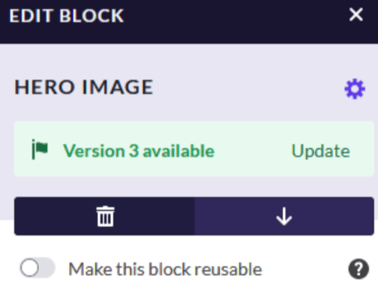
If you wish to remain on a previous version of the Block after updating, you can click the Purple Gear Icon to change between versions. Volusion recommends updating blocks whenever they are available.
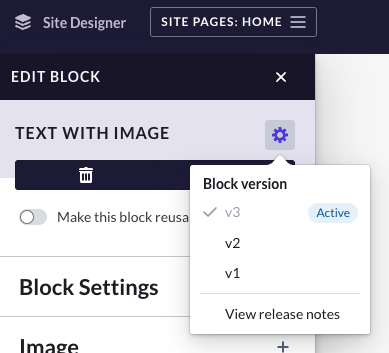
That's it! Your site is now using the most recent version of Site Designer. You can click 'View Release Notes' to gain extra information about the changes made to the block. You also will see notifications in your admin Dashboard about new Block updates available in Site Designer !
- [Getting started](https://help.volusion.com/s/getting-started?hsLang=en-us)
- [Manage Your Store](https://help.volusion.com/s/manage-your-store?hsLang=en-us)
- [Marketing for Success](https://help.volusion.com/s/marketing-for-success?hsLang=en-us)
- [Volusion Payment Powered by Stripe](https://help.volusion.com/s/volusion-payment-powered-by-stripe?hsLang=en-us)
- [Partner Marketplace](https://help.volusion.com/s/partner-marketplace?hsLang=en-us)
- [Support](https://help.volusion.com/s/support?hsLang=en-us)
- [V1](https://help.volusion.com/s/v1?hsLang=en-us)
- [Security](https://help.volusion.com/s/security?hsLang=en-us)
[](https://volusion.com/)
[mailto:email@email.com](mailto:email@email.com)
Copyright © 2026, Volusion