
What is Volusion Payments Powered by Stripe?
Volusion Payments Powered by Stripe is a simple and powerful way to accept payments natively in your Volusion store. We built Volusion Payments using Stripe's world-class infrastructure. Millions of businesses--ranging from startups to Fortune 500 companies--also rely on Stripe's software tools to accept payments securely and expand globally.
Is Volusion Payments secure? Will I be PCI-compliant?
Yes! Volusion Payments meets and exceeds the most stringent industry standards for security. Stripe is also audited by a PCI-certified auditor and is certified to PCI Service Provider Level 1. This is the highest level of certification available. Visit Security at Stripe to learn more about the technical details of Stripe's secure infrastructure. You can see Stripes' PCI certification here.
Who is Volusion Payments for? Who cannot use Volusion Payments?
Volusion Payments is currently available to US merchants only.
Confirm your business type is allowed by reviewing Stripe's Prohibited & Restricted Businesses. If you're not sure if your business falls into the categories listed here, reach out to our Payments Team at (800)-646-3517 ext. 3
Is Volusion Payments a gateway? Why should I use Volusion Payments instead of other gateways?
Volusion Payments Powered by Stripe is a complete solution that combines the functionality of a merchant account and a gateway in one, which means you can accept payments and deposit funds into a bank account without extra steps or additional tools to maintain. You cannot use existing merchant accounts or gateways with Volusion Payments Powered by Stripe, as it functions as both already.
What payment methods can I accept with Volusion Payments?
Merchants can also accept the payment methods below.
-
Visa, MasterCard, Discover, and American Express
-
Apple Pay: Works on Apple devices operating using Safari starting with iOS 10.
-
Google Pay: Works on Android devices using Chrome with Google Pay configured in the browser.
-
Stripe Link: Saves and auto-fills your customers' payment and shipping information for faster checkout.
-
Buy Now Pay Later: Financing options through Affirm, Afterpay, and Klarna.
Do I need to make changes within my store before applying for Volusion Payments?
In order to use Volusion Payments powered by Stripe, your store must have Premium Checkout enabled. Review our Premium Checkout Help Center Article for information about Premium Checkout and how to enable it.
What will my customers see when they checkout?
In the Payment Screen of the checkout page, there will be a radio button labeled Common Payment Methods. This is where the shopper can choose to enter their credit card information or choose to use one of the other payment options offered.
Premium Checkout: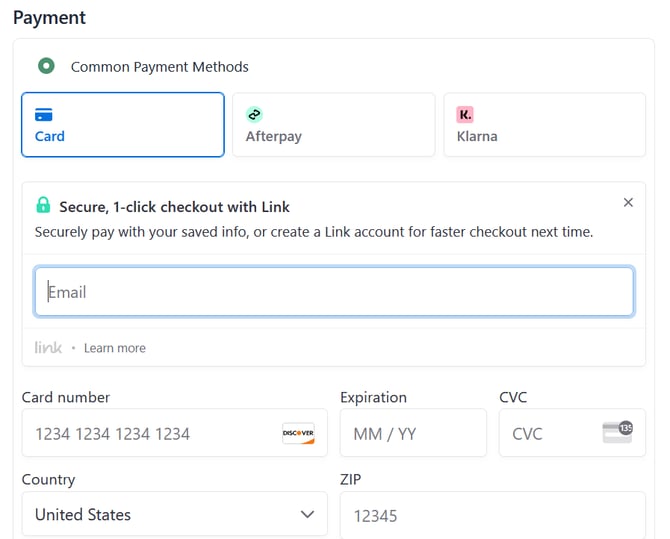
One Page Checkout (Premium Checkout Disabled)
How do I sign up for Volusion Payments?
Sign in to your Volusion store and click on Settings. From there, click on Payments. Select Volusion Payments from the Gateway Name drop-down and click on the Apply Now button to begin the onboarding process. Be sure to fill out all of the fields and agree to the terms to begin processing quickly!
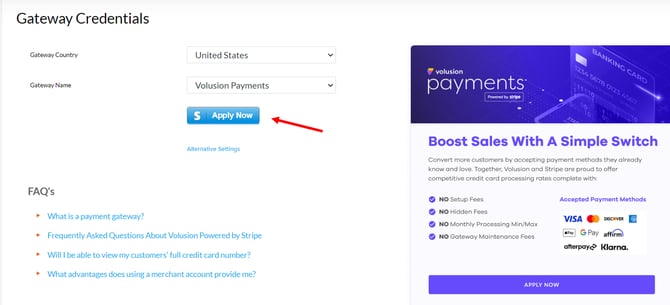
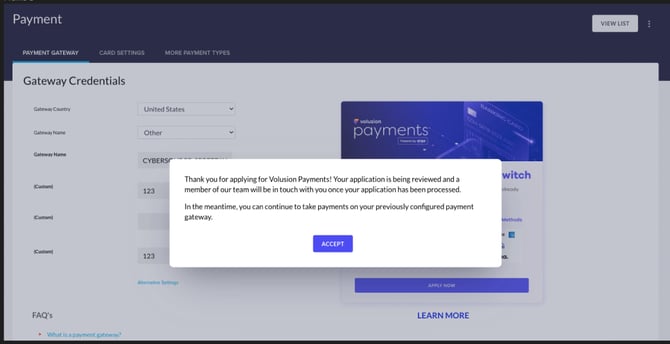
Not seeing the Credit Card Fields on the Checkout Page?
Ensure that the 'Common Payment Method" setting is enabled. You can verify this by clicking the 'View List' button on the top right of the Settings > Payments Page. You must have the 'Common Payment Method' payment method enabled. 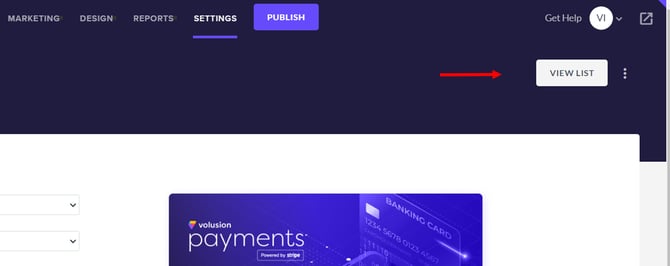
What information and documents do I need to sign up for Volusion Payments?
To sign up for an account, you'll need an email address and password. To activate your account, we need details about your business and about you. Common follow-up requirements include:
What do I do if I have issues signing up with Volusion Payments or additional questions?
Our Payments Team is here to help and can be reached Monday through Friday between 9 am and 5 pm CT at (800)-646-3517 ext. 3
Why was my application declined?
As Volusion Payments provides financial services, there are a number of restrictions we have to operate under. We have outlined these in our Terms of Service.
If your account is not approved and you would like to switch to a different payment gateway, log into the Admin Dashboard and click on Settings > Payment. Under the Volusion Payments section, click on the Disconnect Stripe button and then you can select and plug in one of our other Payment Gateway Integrations.