
While your sites domain name is being indexed by the Domain Name Server (DNS), the internets equivalent of a phone book, (typically a 24-72 hour process), you may find that your domain name redirects to a temporary address the volusion.store address.
If this continues to happen even after your sites been propagated the technical term for your sites info being updated across the internet try correcting it by taking these 3 simple steps:
In your store's Admin Dashboard, go to Settings > Company.
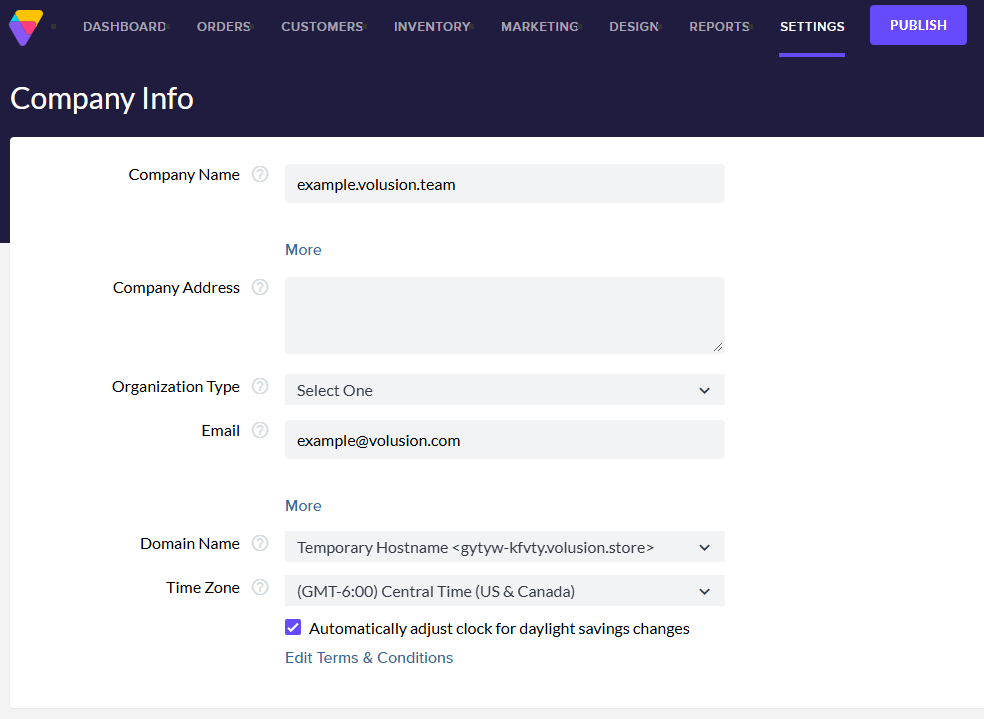
Change the Domain Name menu from your temporary hostname to your registered domain name.
Click the Save button at the top right of the page.
Your store URL should now display your real domain name (no longer the volusion.store address).
However, if you see the message below:
ERROR: No store configured at "http://www.domain.com/". If you have just changed your DNS, please allow 24-72 hours before changing this value.
There are a couple of logical explanations:
-
Too soon. You may have attempted to change from your temporary hostname before your domain's new Volusion Name Servers (NS1.VOLUSION.COM, NS2.VOLUSION.COM, NS3.VOLUSION.COM, and NS4.VOLUSION.COM) are fully propagated. Solution: Wait at least 24-72 hours before attempting to select your domain in the Domain Name drop-down.
-
Domain name change. If you changed the Name Servers for a domain not associated with your hosting plan, you will not be able to configure that domain to point at your store. Solution: Contact Volusion Support to get instructions about initiating a domain name change.
If you're still unable to change the domain name of your store after more than 72 hours, check out the following articles on DNS:
And if those don't do the trick, contact Volusion support, and well be happy to help you.