---
title: "Postage Printing: How to Print Labels"
description: Every shipped package needs a label. Discover how to print them from your VOLT store.
---
[Skip to content](https://help.volusion.com/s/postageprintinghowtoprintlabels#main-content)
English - United States
Show submenu for translations

Open main navigation
Close main navigation
- English - United States
Show submenu for translations
- [Contact Us](https://volusion.com/contact)
[Contact Us](https://volusion.com/contact)
Search the Help Center
- There are no suggestions because the search field is empty.
1. [Volusion Help Center](https://help.volusion.com/s?hsLang=en-us)
2. [V1](https://help.volusion.com/s/v1?hsLang=en-us)
# Postage Printing: How to Print Labels
If you've installed our [Postage Printing](https://help.volusion.com/run-your-business/the-postage-printing-app?hsLang=en-us)feature and set up label printing, you can print labels as you [process your orders](https://help.volusion.com/run-your-business/orders-app-how-to-process-orders?hsLang=en-us).
Print Labels During Order Processing
Look for the **Buy Shipping Label** button in the address section.
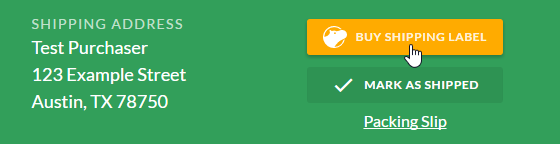
You'll then see a label details dialog box pre-filled with your selections from the Postage Printing app setup process. You can leave them or edit them as you like. If your order contains one or more products without a **Weight** value, you'll have to enter it at this point (this designation is order-specific; it won't populate to the product record itself). When you're ready to proceed, press **Confirm Package**. You'll receive a list of rates for available options.
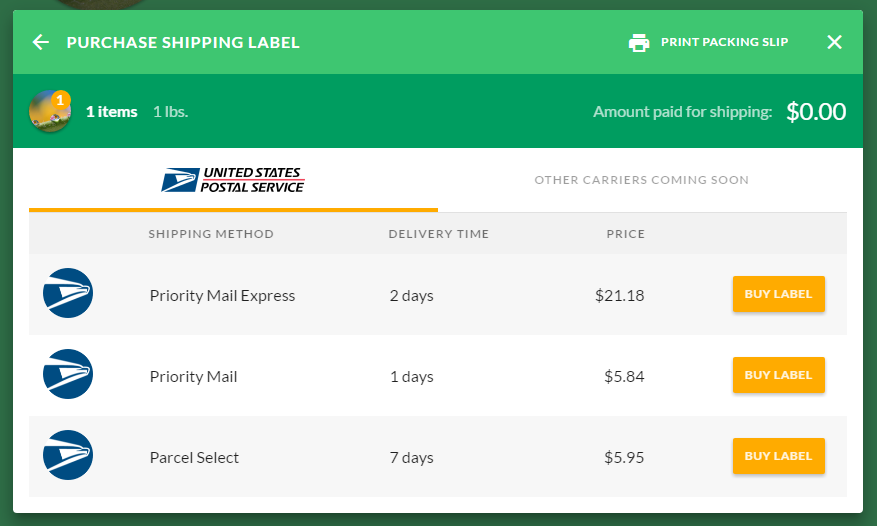
Press **Buy Label** next to the selection of your choice. On the label review dialog box, you'll see: the shipping method, the cost, the shipping address, the return address, your preferred label file format selection (you can change it for an individual order here), your default selection for return postage printing (you can change it for an individual order here), and your payment method (click **Edit** to change your [default payment method](https://help.volusion.com/run-your-business/my-account?hsLang=en-us)).
Once you press **Confirm Purchase**, we'll bill you. If you choose to print a return label as well, you won't see a separate itemized charge for it, but you'll be billed for it when (and only if) the carrier scans it for return delivery.
On the purchase confirmation dialog box, press **Print Label** to access your label. If you chose to print a return label as well, press **Print Return Label** to access it. You can also press **Not Now** to defer label printing until a more convenient time.
Once you're finished, you'll see the carrier's tracking number in the address section of the order.
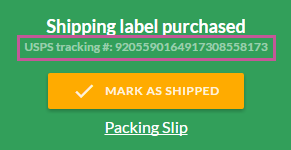
To print the label at your convenience, access the three-dot more options menu and select **Print Shipping Label**. If you chose to generate a return label as well, you can access it here by selecting **Print Return Label**.
If you need to void a label you've bought prior to delivery, you can do so. From the same menu, select **Refund shipping label** and confirm by pressing **Get Refund**. If you do, you'll receive a refund of the charge amount minus Shippo transaction fees.
- [Getting started](https://help.volusion.com/s/getting-started?hsLang=en-us)
- [Manage Your Store](https://help.volusion.com/s/manage-your-store?hsLang=en-us)
- [Marketing for Success](https://help.volusion.com/s/marketing-for-success?hsLang=en-us)
- [Volusion Payment Powered by Stripe](https://help.volusion.com/s/volusion-payment-powered-by-stripe?hsLang=en-us)
- [Partner Marketplace](https://help.volusion.com/s/partner-marketplace?hsLang=en-us)
- [Support](https://help.volusion.com/s/support?hsLang=en-us)
- [V1](https://help.volusion.com/s/v1?hsLang=en-us)
- [Security](https://help.volusion.com/s/security?hsLang=en-us)
[](https://volusion.com/)
[mailto:email@email.com](mailto:email@email.com)
Copyright © 2026, Volusion