
Starting in April 2025, PayPal started requiring a secondary Secure Customer Authentication prompt (sent to the shopper) to capture funds in excess of the amount initially authorized.
The Payment Services Directive 2 (PSD2) regulation is an EU regulation that requires payment service providers to enhance customer authentication processes in order to protect consumers from fraud. A key component of PSD2 regulation is the Strong Customer Authentication (SCA) requirements, which mandates additional authentication measures and restrictions to be performed on electronic transactions involving consumers (buyers) from the PSD2 countries.
The changes are in response to the principles set by The European Banking Authority (EBA) for transactions where the final amount is unknown.
The final transaction amount can't be higher than the authenticated amount: "If the final amount is higher than the amount the payer was made aware of and agreed to when initiating the transaction, the payer's PSP shall apply SCA to the final amount of the transaction or decline the transaction."
The final transaction amount may be lower than the authenticated amount: "If the final amount is equal to or lower than the amount agreed in accordance with Article 75(1) of PSD2, the transaction can be executed, and there is no need to re-apply SCA, as the authentication code would still be valid in accordance with Article 5(3)(a) of the [RTS]."
What you need to do as a merchant:
In order to comply with this secondary prompt requirement, merchants that need to capture funds through PayPal for an amount larger than the initially authorized amount must use the PayPal dashboard to request that capture. To learn how to do that, you can go here to see PayPal's instructions on capturing payment.
The shopper will then receive another Secure Customer Authentication (SCA) prompt to authorize the capture of a greater value than the initial authorization.
Once the shopper approves the SCA prompt, your PayPal dashboard will receive an update stating that the funds have been captured.
You may then open the Volusion dashboard and manually log the capture of funds on the order to continue processing the order.
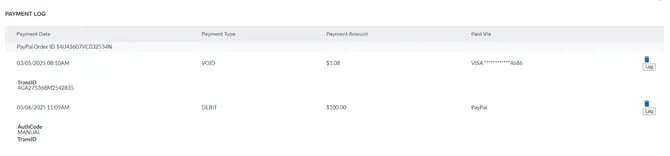
You can find instructions for doing an Offline Payment Record in our How to Add an Offline Payment article.