---
title: Limiting Addresses Displayed During Checkout
description: It's great to allow your customers to store multiple addresses in your system for easy checkout, but displaying too many could slow it down.
---
[Skip to content](https://help.volusion.com/s/limitingaddressesdisplayedduringcheckout#main-content)
English - United States
Show submenu for translations

Open main navigation
Close main navigation
- English - United States
Show submenu for translations
- [Contact Us](https://volusion.com/contact)
[Contact Us](https://volusion.com/contact)
Search the Help Center
- There are no suggestions because the search field is empty.
1. [Volusion Help Center](https://help.volusion.com/s?hsLang=en-us)
2. [V1](https://help.volusion.com/s/v1?hsLang=en-us)
# Limiting Addresses Displayed During Checkout
Limiting Addresses Displayed During Checkout It's great to allow your customers to store multiple addresses in your system for easy checkout, but displaying too many could slow it down.
Your website is an information powerhouse, storing all kinds of valuable info, including customers billing and shipping addresses. Every time a registered customer enters a new billing or shipping address during the checkout process, its warehoused in your stores system and made available to that customer the next time he or she checks out (via a drop-down menu). Convenient, right?!
However, sometimes things can get a *little* out of hand if a customer adds a bunch of different addresses and this can actually slow down your stores one-page-checkout.asp page. This can result in a poor user experience: delays and timeout errors.
To prevent these problems, you can limit the number of addresses that will display in the dropdown at checkout. Here's how:
From your Admin Dashboard go to **Settings \> Config Variables.**
Find the variable for **Maximum Number of Addresses in Billing and Shipping Dropdowns.** You can do this by clicking on **Checkout Variables** at the top of the list and scrolling down to the correct variable.
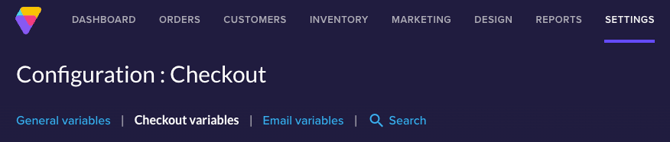
**Enter a value** to limit the number of saved addresses that will appear in the drop-down (We recommend around 10).

Your customer can still save more than maximum number of addresses that you specify (none of them will be deleted). However, they will only see the most recent ones in the drop-down menu.
If they want to access and manage their older addresses, they can log in and visit the Personal Information section of their My Account page.
Summary
Your customers will appreciate that your store allows them to save multiple billing and shipping addresses. However, theyll also appreciate that you limit the number that display in the drop-down at checkout, so that they have a great user experience.
- [Getting started](https://help.volusion.com/s/getting-started?hsLang=en-us)
- [Manage Your Store](https://help.volusion.com/s/manage-your-store?hsLang=en-us)
- [Marketing for Success](https://help.volusion.com/s/marketing-for-success?hsLang=en-us)
- [Volusion Payment Powered by Stripe](https://help.volusion.com/s/volusion-payment-powered-by-stripe?hsLang=en-us)
- [Partner Marketplace](https://help.volusion.com/s/partner-marketplace?hsLang=en-us)
- [Support](https://help.volusion.com/s/support?hsLang=en-us)
- [V1](https://help.volusion.com/s/v1?hsLang=en-us)
- [Security](https://help.volusion.com/s/security?hsLang=en-us)
[](https://volusion.com/)
[mailto:email@email.com](mailto:email@email.com)
Copyright © 2026, Volusion