---
title: How to Use a Third-Party Email Host With Volusion
description: See how Volusion and your favorite third-party email host can tag-team to make you a communications powerhouse.
---
[Skip to content](https://help.volusion.com/s/howtouseathird-partyemailhostwithvolusion#main-content)
English - United States
Show submenu for translations

Open main navigation
Close main navigation
- English - United States
Show submenu for translations
- [Contact Us](https://volusion.com/contact)
[Contact Us](https://volusion.com/contact)
Search the Help Center
- There are no suggestions because the search field is empty.
1. [Volusion Help Center](https://help.volusion.com/s?hsLang=en-us)
2. [V1](https://help.volusion.com/s/v1?hsLang=en-us)
# How to Use a Third-Party Email Host With Volusion
See how Volusion and your favorite third-party email host can tag-team to make you a communications powerhouse.
Email is an important way to stay in touch with your customers.You can establish a rapport and engage new and existing customers with messages about important account and order info, product updates, promo emails and newsletters.
Volusion allows you to add email accounts and storage to your monthly hosting plan. This way, when you send messages, they come from your stores domain name, such as [news@yourstore.com](mailto:news@yourstore.com), which your customers will recognize and trust.
However, because were all about giving you options, you also can integrate a third-party email system, like MailChimp or ConstantContact. We'll tell you how.
**Forwarding MX Records From Volusion**
To host your store's email with a third-party, youll need to forward the MX records from Volusion to your preferred third-party email host.
An MX record is a specific network name for a standard email system that defines the location and identity of that system on the web. Depending on the email system, there may be more than one MX record you'll need to forward from Volusion.
Forwarding MX records can apply to any standard email system available, from other domain hosting systems like [Godaddy.com](http://godaddy.com/) to web mail systems like Hotmail and Gmail.
Youll see below that Gmail relies on 5 MX records, each one with a priority number:
**Gmail MX Record**: [ASPMX.L.GOOGLE.COM](http://aspmx.l.google.com/)
**Priority**: 1
**Gmail MX Records**: [ALT1.ASPMX.L.GOOGLE.COM](http://alt1.aspmx.l.google.com/)
**Priority**: 5
**Gmail MX Record**: [ALT2.ASPMX.L.GOOGLE.COM](http://alt2.aspmx.l.google.com/)
**Priority**: 5
**Gmail MX Record**: [ALT3.ASPMX.L.GOOGLE.COM](http://alt3.aspmx.l.google.com/)
**Priority**: 10
**Gmail MX Record**: [ALT4.ASPMX.L.GOOGLE.COM](http://alt4.aspmx.l.google.com/)
**Priority**: 10
For more in-depth information on configuring domains for use with Gmail and other Google apps, please visit some of Google's [online tutorials](https://www.google.com/support/a/bin/answer.py?answer=53295&topic=14592).
Volusion stores are only compatible with email hosts that use static MX records.
The location and listing of an email system's MX record(s) differ from system to system. In most cases, you'll be able to retrieve the MX Records from your email host by logging into any web-based account their service provides or by contacting the hosts technical support team.
**If you currently use Volusion-hosted mailboxes**, be sure to forward or save any email messages you need to keep before you point your MX records away from Volusion. You won't be able to retrieve any mail from your Volusion mailboxes afterward.
**Forwarding MX Records from Volusion**
To get started, log in to your account at [my.volusion.com](https://my.volusion.com/). Under the **My Store**s heading in the menu on the left, click **Manage DNS**. Make sure the drop-down menu at the top of the page is set to the correct domain name for your hosting plan.
Complete each of the following DNS record updates:
### Delete Volusion MX Records
Locate the existing entry for Volusion's MX records (mx3.volusion.com and mx4.volusion.com) and the "mail" CNAME record.
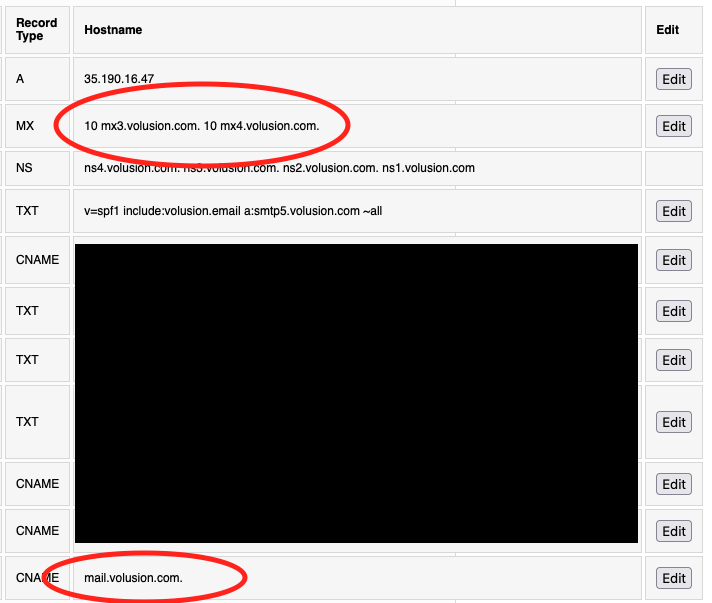
To remove the "mail" CNAME record:
1. Click **Edit** in the far right column of the mail record row.
2. Click **Delete** to remove the record, then click **Delete** a second time to confirm.
### Edit MX Records
Edit the current MX records entry to delete the existing Volusion records and add as many as are required by your preferred email host. Each MX record should be entered on a new line. See the "What's an MX record?" section above for examples.
To edit your MX records:
1. Click **Edit** in the far right column of the mail record row.
2. Clear any existing records so that the field is blank.
3. If your first MX record has a priority number, enter that number first, followed by a space., then type the full MX record name. For example, if the record is [ALT1.ASPMX.L.GOOGLE.COM](http://alt1.aspmx.l.google.com/) and has a priority of 10, enter "10 [ALT1.ASPMX.L.GOOGLE.COM](http://alt1.aspmx.l.google.com/)".
4. To add another MX record, jump to the next line in the same text box and repeat the process. You can add as many MX records as your mail provider requires, making sure to start each record on a new line.
5. When you're done entering all records, click **Save**.

Please note that it can take up to 24 hours for MX records to propagate and emails to begin arriving at your new email host.
**Delete Existing Mailboxes from myVolusion**
If you've created mailboxes in the past, you must delete them entirely to avoid incurring email hosting fees on your monthly statement. If you never configured mailboxes for your hosting plan, this portion of the article may not apply to you.
Before you proceed, make sure that your MX record changes have propagated and you're able to send and receive mail through the new email provider. Otherwise, you may lose any incoming or outgoing messages that were sent before propagation was complete.
To delete a mailbox:
1. Under the **Stores** heading in the menu on the left, click **Manage Email**.
2. If you have multiple hosting plans, make sure the drop-down menu at the top of the page is set to the correct plan.
3. Under **Mailboxes**, click the **x** icon next to a mailbox to remove it. Click **Delete** to confirm your selection.
Repeat the above process until there are no mailboxes listed.
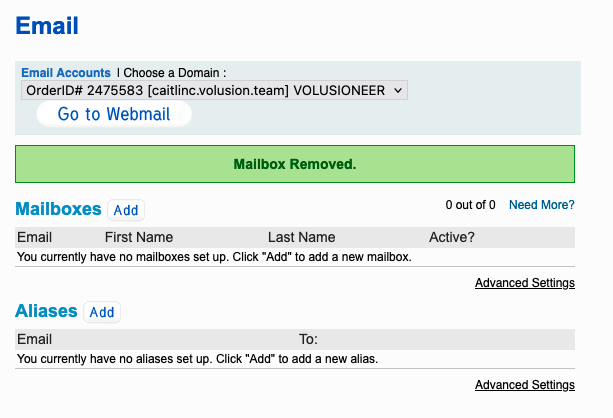
If you need to remove mailboxes from other hosting plans, select a plan from the drop-down menu at the top of the page and repeat the above steps. You only need to modify a hosting plan's DNS records if you plan to continue using the associated email addresses with a third-party provider.
To confirm that your hosting plan has zero (0) mailboxes, click the Volusion logo to return to your myVolusion account overview. Under **Account Information**, you should see a "0" in the **Mailboxes** column. If you see any other number, reread the steps in this section to ensure you've deleted all mailboxes for the relevant hosting plan(s).

- [Getting started](https://help.volusion.com/s/getting-started?hsLang=en-us)
- [Manage Your Store](https://help.volusion.com/s/manage-your-store?hsLang=en-us)
- [Marketing for Success](https://help.volusion.com/s/marketing-for-success?hsLang=en-us)
- [Volusion Payment Powered by Stripe](https://help.volusion.com/s/volusion-payment-powered-by-stripe?hsLang=en-us)
- [Partner Marketplace](https://help.volusion.com/s/partner-marketplace?hsLang=en-us)
- [Support](https://help.volusion.com/s/support?hsLang=en-us)
- [V1](https://help.volusion.com/s/v1?hsLang=en-us)
- [Security](https://help.volusion.com/s/security?hsLang=en-us)
[](https://volusion.com/)
[mailto:email@email.com](mailto:email@email.com)
Copyright © 2026, Volusion