---
title: Clearing Browser Cache (MacOS Safari)
description: "There's two ways to clear Safari's cache. The easy way: Option + Command + E."
---
[Skip to content](https://help.volusion.com/s/clearingbrowsercachemacossafari#main-content)
English - United States
Show submenu for translations

Open main navigation
Close main navigation
- English - United States
Show submenu for translations
- [Contact Us](https://volusion.com/contact)
[Contact Us](https://volusion.com/contact)
Search the Help Center
- There are no suggestions because the search field is empty.
1. [Volusion Help Center](https://help.volusion.com/s?hsLang=en-us)
2. [V1](https://help.volusion.com/s/v1?hsLang=en-us)
# Clearing Browser Cache (MacOS Safari)
There's two ways to clear Safari's cache. The easy way: **Option** + **Command** + **E**. This should immediately empty the cache and will not require a browser restart.
If that doesn't work, follow these instructions:
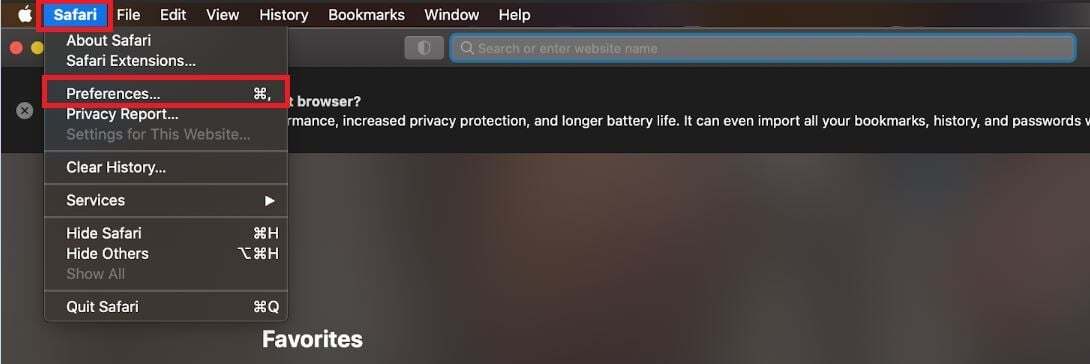
Launch Safari, click Safari in the upper-left corner of the main menu bar, and select the Preferences option near the top of the drop-down menu.
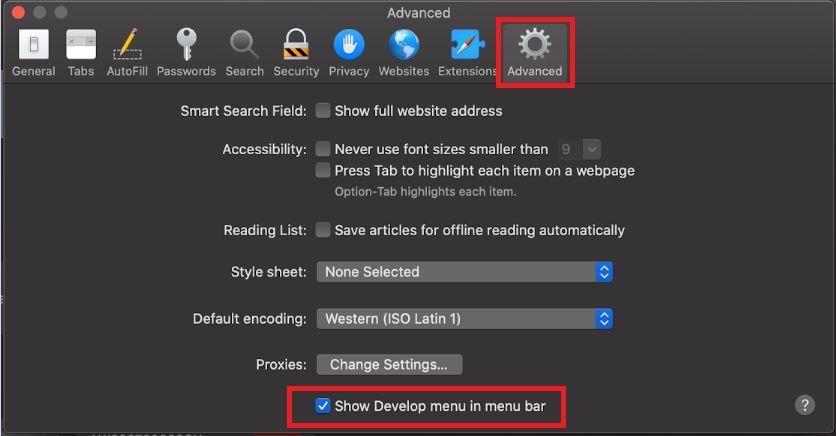
Afterward, click the Advanced tab located in the top navigation bar and check the box directly to the left of the Show Develop menu in menu bar option to add the menu to Safari by default.
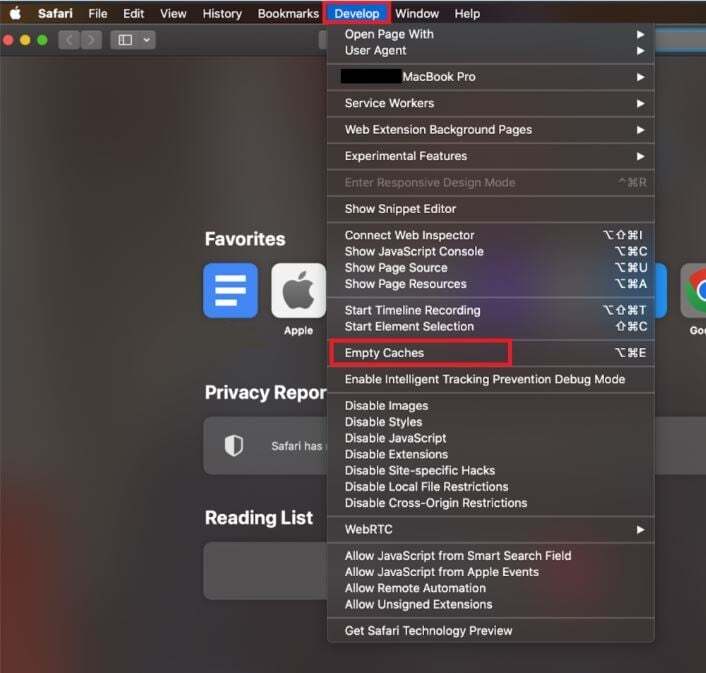
Click the Develop menu near the middle of the main Safari menu bar and select the Empty Caches option.
- [Getting started](https://help.volusion.com/s/getting-started?hsLang=en-us)
- [Manage Your Store](https://help.volusion.com/s/manage-your-store?hsLang=en-us)
- [Marketing for Success](https://help.volusion.com/s/marketing-for-success?hsLang=en-us)
- [Volusion Payment Powered by Stripe](https://help.volusion.com/s/volusion-payment-powered-by-stripe?hsLang=en-us)
- [Partner Marketplace](https://help.volusion.com/s/partner-marketplace?hsLang=en-us)
- [Support](https://help.volusion.com/s/support?hsLang=en-us)
- [V1](https://help.volusion.com/s/v1?hsLang=en-us)
- [Security](https://help.volusion.com/s/security?hsLang=en-us)
[](https://volusion.com/)
[mailto:email@email.com](mailto:email@email.com)
Copyright © 2026, Volusion