---
title: Category Selector Troubleshooting
description: If you're running into errors while assigning categories, we have some quick tips to get you back on track.
---
[Skip to content](https://help.volusion.com/s/categoryselectortroubleshooting#main-content)
English - United States
Show submenu for translations

Open main navigation
Close main navigation
- English - United States
Show submenu for translations
- [Contact Us](https://volusion.com/contact)
[Contact Us](https://volusion.com/contact)
Search the Help Center
- There are no suggestions because the search field is empty.
1. [Volusion Help Center](https://help.volusion.com/s?hsLang=en-us)
2. [V1](https://help.volusion.com/s/v1?hsLang=en-us)
# Category Selector Troubleshooting
If you're running into errors while assigning categories, we have some quick tips to get you back on track.
If you've been assigning a product to categories, or assigning one category as a subcategory of another, you may see an option that consists of two category names referring back to each other repeatedly:
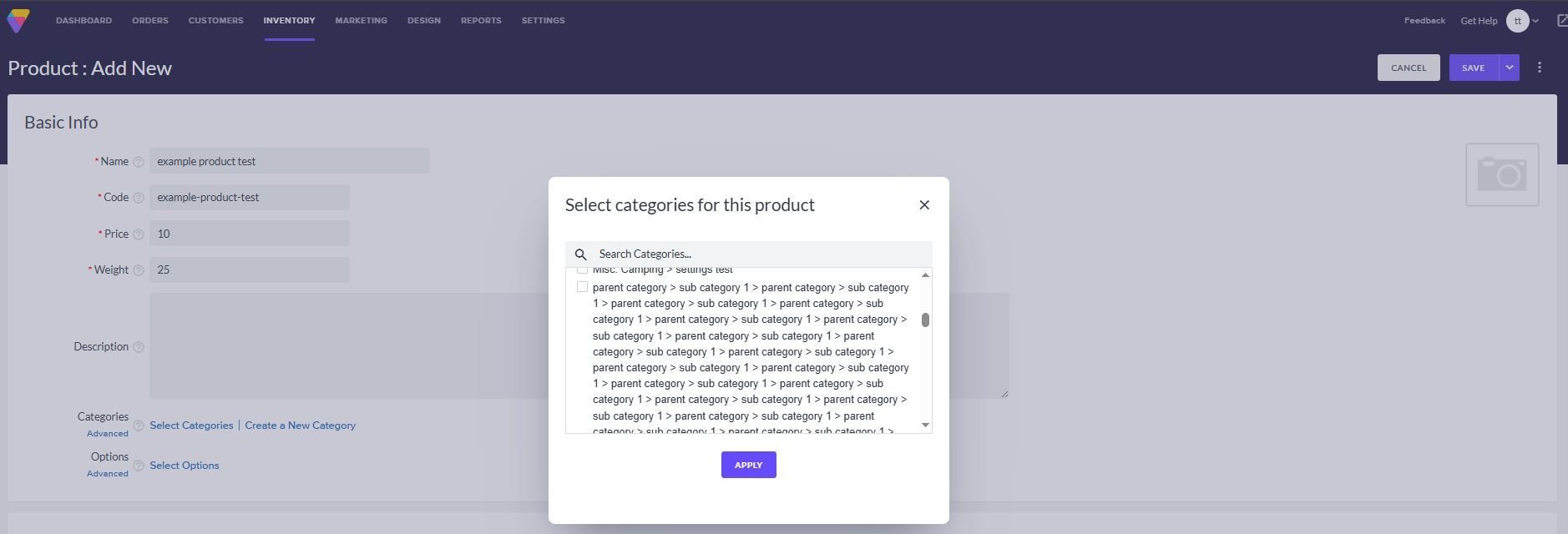
Alternatively, you may receive an error message that prevents you from accessing the category selector, such as:
```
An error has occurred. Please try your request again, or contact customer service for assistance. Thank you.
Please provide Reference #118120277 if contacting customer service.
```
In both cases, the most likely source is that you have inadvertently assigned two categories as subcategories of each other. There are several ways to address this problem. We recommend simply editing the **Subcategory of** value on the categories involved to remove the loop.
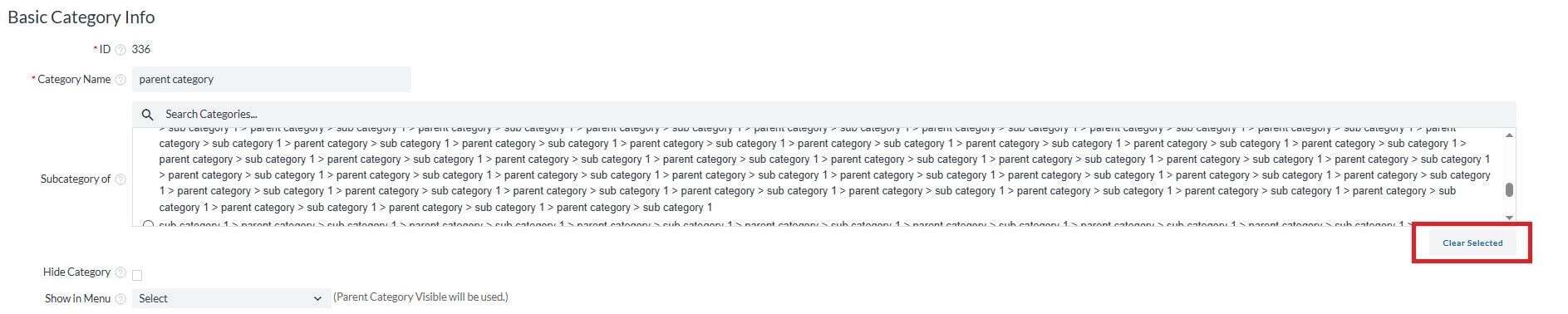
To do so, go to **Inventory** \> **Categories**, hover over the category of your choice, and press **Edit**. Here, press **Clear Selected** below the category selector and reassign the value as appropriate. Be sure the category that you are assigning is not listed in the selection itself, as in the following example:
If the category you would like to edit is not visible in the category tree, press **View List**. Here, you can either select the ID number of the category and follow the procedure above, or hover over the **Parent ID** column heading, press **Edit**, edit the row of your choice, and press **Save**. If the **Parent ID** column is not exposed, click the three-dot actions menu icon, select **Customize Columns**, select the **Parent ID** check box, and press **Apply Changes**.
Summary
Quickly getting past an issue with a simple fix can be a huge relief and time saver. Be sure to check your Volusion Knowledge Base for more of these quick fixes if you come across other issues. We'll get you back in business in no time.
- [Getting started](https://help.volusion.com/s/getting-started?hsLang=en-us)
- [Manage Your Store](https://help.volusion.com/s/manage-your-store?hsLang=en-us)
- [Marketing for Success](https://help.volusion.com/s/marketing-for-success?hsLang=en-us)
- [Volusion Payment Powered by Stripe](https://help.volusion.com/s/volusion-payment-powered-by-stripe?hsLang=en-us)
- [Partner Marketplace](https://help.volusion.com/s/partner-marketplace?hsLang=en-us)
- [Support](https://help.volusion.com/s/support?hsLang=en-us)
- [V1](https://help.volusion.com/s/v1?hsLang=en-us)
- [Security](https://help.volusion.com/s/security?hsLang=en-us)
[](https://volusion.com/)
[mailto:email@email.com](mailto:email@email.com)
Copyright © 2026, Volusion