---
title: All About Abandoned / Live Carts
description: Learn more below on how to access abandoned carts and to learn more about your customers' shopping habits.
---
[Skip to content](https://help.volusion.com/s/allaboutabandonedlivecarts#main-content)
English - United States
Show submenu for translations

Open main navigation
Close main navigation
- English - United States
Show submenu for translations
- [Contact Us](https://volusion.com/contact)
[Contact Us](https://volusion.com/contact)
Search the Help Center
- There are no suggestions because the search field is empty.
1. [Volusion Help Center](https://help.volusion.com/s?hsLang=en-us)
2. [V1](https://help.volusion.com/s/v1?hsLang=en-us)
# All About Abandoned / Live Carts
Learn more below on how to access abandoned carts and to learn more about your customers' shopping habits.
The Abandoned / Live Carts page is a powerful tool for getting to know your customers. Not only does it let you view the items in a shopper's cart before they check out, but you can also learn why some shoppers abandon their carts.
**The Abandoned / Live Carts Table**
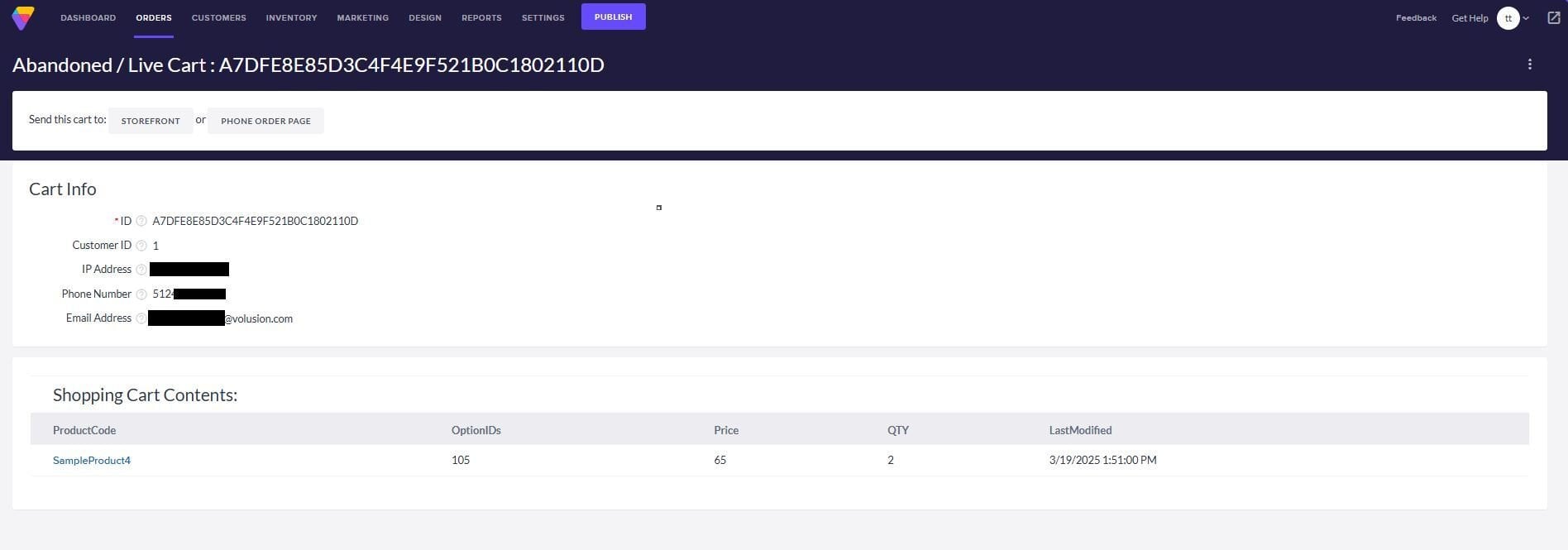
Whenever a shopper on your store adds an item to their cart, the software assigns that cart a random ID. The table on the Abandoned / Live Carts page lists information for every cart that is abandoned or currently open on your storefront, along with customer info for users that were logged in when they filled their cart.
**Retention Email**
If an abandoned cart is associated with an existing customer's email address, you can also send them a helpful reminder email with the **Retention Email** button. This email asks the shopper if they have any questions or need help completing the order.
By default, a cart must be abandoned for 12 hours before the **Send Retention Email** link will appear. If you want the option to send retention emails sooner, just go to **Settings \> Config Variables** and perform a search with the term "retention" in the **Name** field. Modify the numerical value in the field next to **Retention Email Waiting Period in Hours** and save.
You can also reword the email customers receive by editing the **Retention Email**. This can be edited via the **FTP**. Directions are included in [THIS](https://help.volusion.com/s/usingyourvolusionftpsftpaccount?hsLang=en-us) article.
### Tips + Tricks for the Abandoned / Live Carts Page
#### Checking Abandoned Carts for Quality Control
You can determine how many abandoned carts are being generated, as well as how frequently, by examining the **Last Modified** field for each cart. You can take this a step further by examining the contents of recently abandoned carts.
Upon examining recently abandoned carts, you might find a common thread among the products that were abandoned by different customers, such as the same one or two products being abandoned by multiple customers. You can use this information to further investigate these products: perhaps one of the products is out of stock, or some other factor is causing people to jump ship.
#### Investigating Abandoned Cart IP Addresses
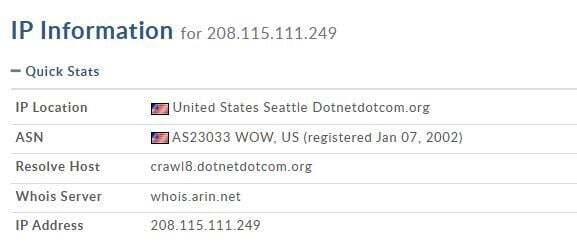
It is a little known (but important) fact that when search engine robots crawl and index ecommerce sites, many of them add random products to the shopping cart. Using the information provided in an Abandoned Cart can help show if it was a web crawler, but do note that not all IP addresses will state if the host is a web crawler.
For example, say you had several abandoned carts from the following IP:
```
208.115.111.249
```
If we use a free tool such as [whois.domaintools](https://whois.domaintools.com/) or [community.spiceworks.com](https://community.spiceworks.com/tools/ip-lookup) we will be able to see where the IP is coming from. In this case, it states in the Hostname that it is a WebCrawler.
Now What?
You could just ignore it, but it's good to know search engines are putting you in their databases and bringing you to the attention of potential customers. But if these abandoned carts are bothersome to your report, you can add some special code to your robots.txt file if you want to prevent crawlers from adding products to the cart. See [SEO Features](https://help.volusion.com/s/articleeofeatures?hsLang=en-us) for information on using the robots exclusion protocol..
If you don't know how to find these options, ask your website developer to help you out.
### Preemptive Marketing
One of the benefits of the **Abandoned / Live Carts** page is that it lists the contact information for customers who are logged in to their accounts. You can use this information to contact customers regarding possible orders.
For example, you may notice that a regular customer in good standing with the store has created several abandoned carts. Using the customer's information listed in the abandoned carts, you can contact the customer to see what's up. This can help you gather valuable as a merchant: perhaps the customer has found the same or a similar product online elsewhere at a better price, or maybe the customer is having trouble deciding on a purchase.
Armed with this kind of information, you may be able to turn these situations around to convert a missed sale into a closed sale, or even address issues with your products that you were unaware of (like a new competitor's pricing).
### Clearing Abandoned Cart Data
Abandoned cart data is cleared automatically, every 30 days.
### Managing Abandoned Cart Data (Export & Delete)
**Gain better insights and clean up your database** by using the new export and delete features in your **Abandoned Carts** report. These tools allow you to download historical shopper data for marketing campaigns or clear out old, anonymous carts to keep your system running efficiently.
#### **How to Export Abandoned Cart Data**
Use this feature to download a spreadsheet of shoppers who left items in their cart without checking out.
1. Navigate to the **Abandoned Carts** report in your dashboard.
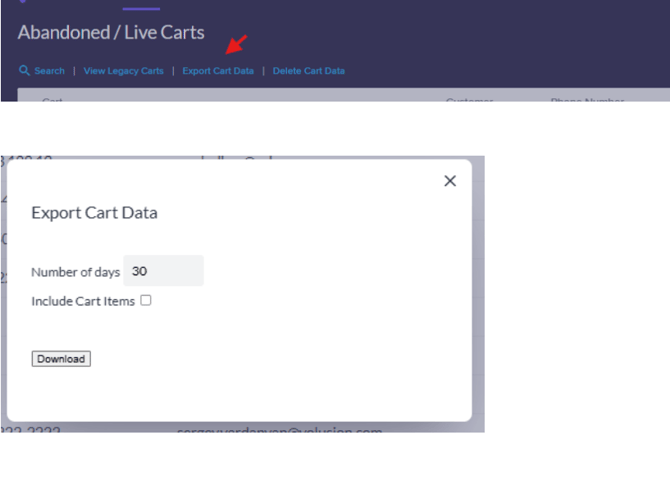
2. Click the **Export Cart Data** link.
3. In the popup window, select your desired **Time Frame** for the report.
4. *(Optional)* Check the **Include cart items** box if you want the spreadsheet to show the specific products shoppers left behind.
5. Click **Export** to download your file.
#### **How to Delete Abandoned Cart Data**
Use this feature to permanently clear out old cart data and save database space.
1. Navigate to the **Abandoned Carts** report in your dashboard.
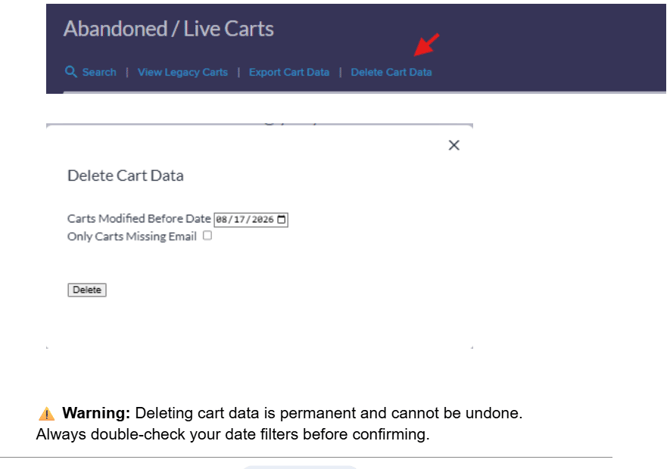
2. Click the **Delete Cart Data** link.
3. In the popup window, select a **Cutoff Date**. All carts created *before* this specified date will be targeted for deletion.
4. *(Optional)* Check the **Only carts missing emails** box if you want to keep carts attached to known customer emails and *only* delete anonymous, guest carts.
5. Click **Delete** to confirm.
- [Getting started](https://help.volusion.com/s/getting-started?hsLang=en-us)
- [Manage Your Store](https://help.volusion.com/s/manage-your-store?hsLang=en-us)
- [Marketing for Success](https://help.volusion.com/s/marketing-for-success?hsLang=en-us)
- [Volusion Payment Powered by Stripe](https://help.volusion.com/s/volusion-payment-powered-by-stripe?hsLang=en-us)
- [Partner Marketplace](https://help.volusion.com/s/partner-marketplace?hsLang=en-us)
- [Support](https://help.volusion.com/s/support?hsLang=en-us)
- [V1](https://help.volusion.com/s/v1?hsLang=en-us)
- [Security](https://help.volusion.com/s/security?hsLang=en-us)
[](https://volusion.com/)
[mailto:email@email.com](mailto:email@email.com)
Copyright © 2026, Volusion